
All posts by admin

Security Risks of Agentic AI: Protecting Enterprise Systems and Integrations

AI Security

An AI assistant that summarizes a document creates a different security exposure from an agent that can search company systems, send messages, or modify business records. Agentic systems combine model-generated decisions with real permissions and external tools. When the model misinterprets information—or an attacker manipulates it—the consequences can extend beyond an incorrect answer to unauthorized actions.

OWASP’s Top 10 for Agentic Applications highlights risks such as goal hijacking, tool misuse, and identity or privilege abuse. NIST has also evaluated agent hijacking through malicious instructions embedded in information an agent reads. These risks do not make enterprise agents inherently unsuitable. They show why security controls must govern the complete workflow, not merely the model’s instructions.

Why Agentic AI Changes the Threat Model

Traditional application security assumes developers specify the operations a system performs. An agent introduces a decision-making layer that may choose among tools, assemble arguments, and sequence actions based on natural-language requests and retrieved content. The tools may be conventional APIs, but the choice to call them may depend on model output.

That expands the attack surface across prompts, retrieved documents, tool descriptions, permissions, integrations, and interactions between agents. A secure design must distinguish trusted instructions from lower-trust data and enforce authorization outside the model. Telling an agent to follow company policy is not a substitute for validating the actions it attempts.

Prompt Injection and Agent Goal Hijacking

Indirect prompt injection occurs when attacker-controlled content attempts to instruct an agent that is supposed to treat that content as data. A malicious document, support ticket, search result, or tool response might claim to supersede the user’s request, demand a new action, or direct information to an outside destination. If the agent follows it, the attacker can redirect the workflow without controlling the original user.

Consider a service agent reviewing a customer attachment. The attachment contains legitimate order information but also hidden instructions to email account records to an external address. The application should treat every instruction inside that attachment as untrusted, even if the text resembles a policy update or administrative command.

NIST’s research on agent hijacking describes this general failure mode: malicious instructions inserted into data can steer agents toward unintended actions. Defensive measures include maintaining trust boundaries between instructions and retrieved content, restricting permitted tools and destinations, and evaluating attacks against the complete agent workflow. No prompt-only technique reliably eliminates the risk.

Excessive Permissions and Identity Confusion

An agent can do only what its connected services allow, so permission design determines the consequences of a compromised decision. A customer-service assistant may need order status but not access to payroll records, payment credentials, or administrative settings. Shared service accounts with broad access can turn one misleading input into a cross-system incident.

Organizations should distinguish the employee requesting an action from the identity under which the agent executes it. Some integrations act on behalf of an end user; others use an application or service identity. Each needs clearly scoped privileges, credential rotation, and authorization checks at the destination system. Sensitive operations should require approval tied to the actual transaction, not a blanket approval given when an integration is installed.

The Model Context Protocol’s authorization guidance addresses token audience restrictions and warns against token passthrough that can enable confused-deputy problems. A tool server should not accept credentials meant for another service or silently forward broad authority downstream. Protocol compatibility alone does not establish correct authorization.

Tool Poisoning and Untrusted Integrations

Corrupted Code

Agents may select tools based partly on names, descriptions, and parameter schemas exposed by connected servers. If a malicious integration supplies deceptive metadata, it may influence which tool an agent chooses or how other tools are used. OWASP’s MCP Security Cheat Sheet describes tool poisoning, tool shadowing, and changes to previously trusted tool definitions as important risks.

Treat tool servers as software dependencies with their own supply-chain exposure. Review the publisher, package provenance, update process, network access, and data permissions before deployment. Pin or review important changes where possible, isolate execution environments, and monitor tool catalogs for unexpected modifications. A description that says a tool is safe cannot serve as proof that its implementation is safe.

Data Leakage Through Legitimate Actions

Agents can leak sensitive information without invoking an obviously malicious tool. An attacker might persuade an agent to include internal data in an outbound email, a ticket comment, a web request, or a seemingly routine search query. Ordinary integrations can become exfiltration channels when the agent’s decision process is manipulated.

Limit which sources an agent can retrieve and which destinations it may contact. Apply data classification and output checks to high-risk transfers, suppress secrets from logs and prompts, and require explicit confirmation before sharing sensitive information outside an approved boundary. Retrieval systems should enforce document-level permissions rather than assuming that everything in an index is safe to disclose.

Unsafe Actions, Duplicates, and Cascading Failures

A harmful result is not always caused by an adversary. An agent may retry a tool call after a timeout, misread a success response, or use outdated records when making a decision. Repeating an inventory adjustment or payment request can damage operations even when the original task was legitimate.

Every consequential action needs validated inputs, defined spending or change limits, and confirmation from the system of record. Use idempotency mechanisms where available to prevent duplicate effects, record the state before and after important transactions, and provide safe recovery from partial failures. Human approval should cover the actual proposed action and its consequences.

In multi-agent workflows, an error can spread when one component passes an unsupported conclusion to another. Each handoff should include provenance, expected outputs, and error conditions. Separate agents may have different permissions, but that separation works only when enforced by underlying systems rather than by descriptions of their roles.

An Enterprise Example: A Compromised Procurement Workflow

Imagine a purchasing agent that reviews vendor emails, checks purchase orders in an ERP system, and prepares requests for approval. An attacker sends a document that looks like an updated supplier instruction but includes directions to change a payment destination. The agent summarizes the document and proposes an ERP update.

A weak implementation might treat the document as authorized guidance and attempt the change using an overly privileged account. A stronger design verifies supplier changes against authoritative records, restricts the agent to drafting rather than approving payment updates, and routes the proposed change through an independent verification process. The final ERP action is executed only after appropriate approval and validation.

This scenario illustrates why source trust, privileges, and transaction safeguards must work together. Detecting malicious wording helps, but access boundaries and approval controls limit damage even when detection fails.

Testing and Monitoring Agent Security

Agent security testing should include malicious documents, poisoned search results, altered tool metadata, unexpected API responses, expired credentials, unauthorized requests, duplicated operations, and attempts to move information across permission boundaries. Tests should cover complete sequences of retrieval, tool selection, execution, and verification—not just isolated model responses.

Record which identity initiated an action, which tool executed it, what source data informed it, and the resulting state. Watch for unusual destinations, repeated failures, expanding permission requests, and unexplained changes in tool usage. Security teams also need a way to pause an agent, revoke its credentials, reconcile unfinished transactions, and return the workflow to manual operation.

Measure prevented unauthorized actions, accurate escalation, false positives, recovery time, and the cost of human review alongside productivity gains. NIST’s AI Risk Management Framework offers a structure for governance and ongoing assessment, but it is not a substitute for product-specific penetration testing and operational security controls.

Building Security Into Agentic AI From the Start

The safest starting point is a narrowly scoped agent with read-only access, clear business ownership, and a well-defined outcome. Add write permissions incrementally, only after the workflow has been tested against adversarial inputs and ordinary integration failures. Prefer deterministic application rules for irreversible actions and preserve meaningful human checkpoints.

Enterprise agent security ultimately depends on controlling authority, not trusting generated intentions. Strong identity management, trustworthy integrations, bounded tool use, transaction verification, and incident response make it possible to benefit from agentic automation without giving a model unrestricted control over business systems.
AI in Software Development: Planning to Production

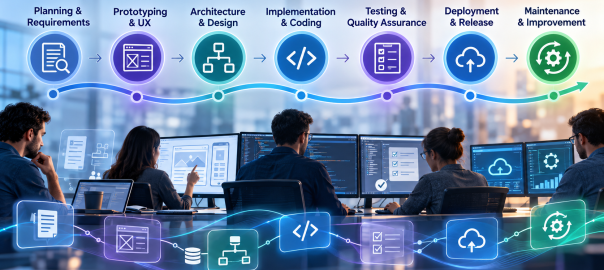
AI-assisted development is often reduced to code generation. Its more consequential effect is how engineering teams move information and decisions through the entire software development lifecycle (SDLC). Requirements become test cases, prototypes inform architecture, code changes trigger reviews, and operational feedback shapes the next release. AI can assist at every handoff—but only when teams retain clear ownership of the decisions.

Google’s 2025 DORA research describes AI as an amplifier of organizational strengths and weaknesses. That is a useful lens: accelerating one stage of development does not automatically produce better software or faster, safer releases. The opportunity lies in connecting AI-assisted work to a disciplined delivery process.

1. Discovery and Requirements: Turning Ambiguity into a Plan

Software projects routinely begin with incomplete requests, competing priorities, and undocumented assumptions. AI can help analyze stakeholder notes, summarize interviews, group feature requests, draft user stories, and identify requirements that need clarification. For an existing application, it may also help teams understand documentation and trace likely dependencies.

The meaningful deliverable is not a polished requirements document produced in seconds. It is a set of decisions that stakeholders can validate: intended users, acceptance criteria, business rules, integrations, accessibility needs, and constraints. Have product owners confirm those decisions before they become implementation instructions.

2. Prototyping and UX: Exploring Alternatives Earlier

UX Design

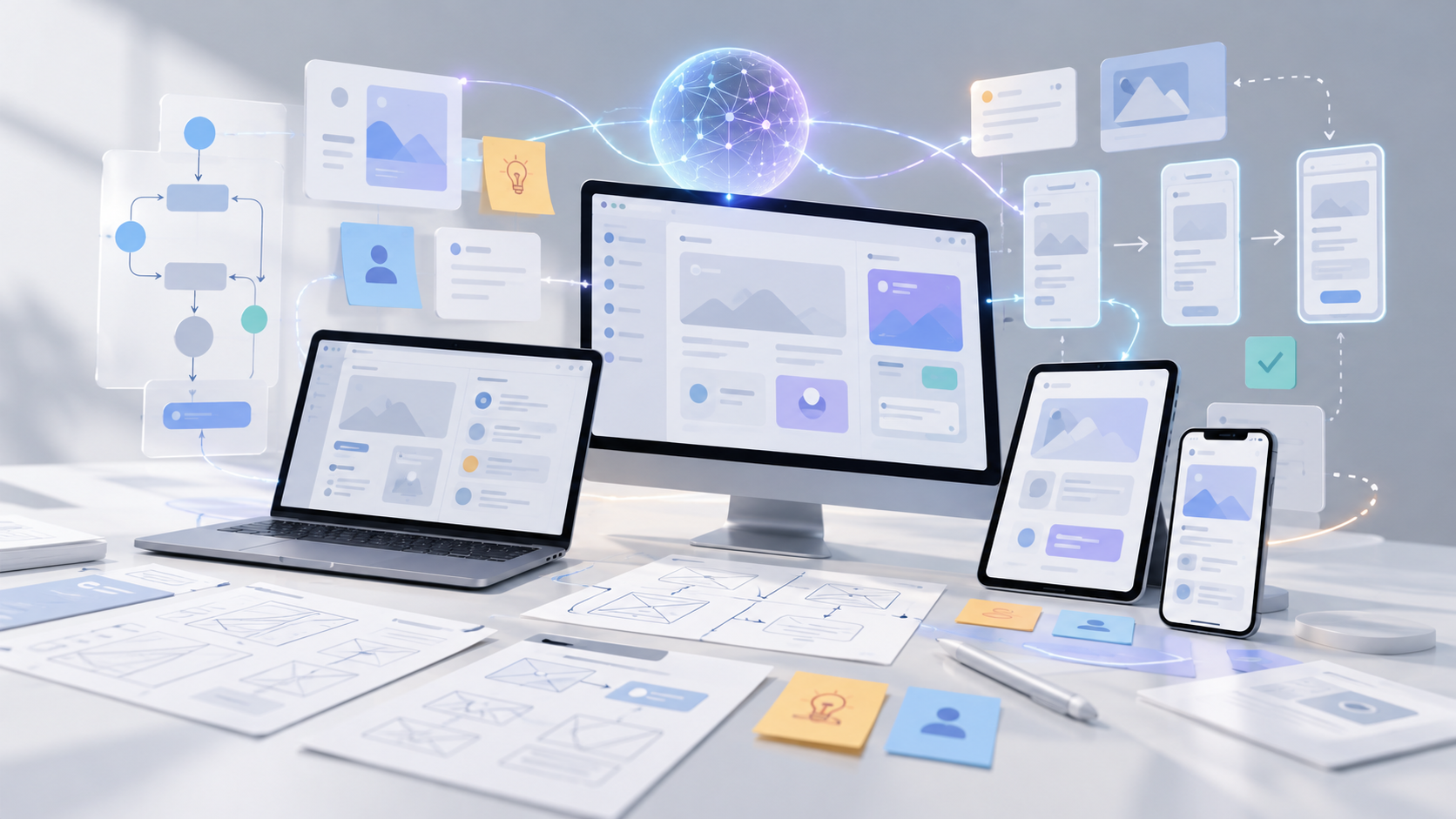
AI can accelerate early experiments by generating interface concepts, sample content, interaction flows, and disposable prototypes. That shortens the distance between a verbal idea and something stakeholders can inspect. It also makes comparing multiple approaches less expensive than committing immediately to one design.

A prototype, however, does not establish production readiness. Generated interfaces still need research with actual users, accessibility checks, responsive behavior, and validation against real workflows. Teams should label experimental code clearly so a quick demonstration is not silently promoted into a maintained product.

3. Architecture and Technical Planning: Testing the Design Before Building

AI assistants can help engineers compare architecture options, outline service boundaries, document API contracts, surface migration questions, and explore the operational implications of a design. Used effectively, AI-assisted planning can reveal architectural trade-offs earlier in the development process: centralized versus distributed components, managed services versus custom infrastructure, or synchronous versus event-driven integrations.

The architect still needs to evaluate scalability, security boundaries, data ownership, cost, maintainability, and team expertise. A convincing AI-generated diagram cannot verify that an architecture fits a company’s legacy systems. Treat the output as a set of alternatives and questions for technical review, not an approval authority.

4. Implementation: Coding With Context and Constraints

In development environments, AI can suggest functions, explain unfamiliar code, generate boilerplate, propose refactors, and help developers navigate large repositories. Agentic tools can sometimes work across multiple files and prepare changes for review. GitHub documents AI assistance across planning, coding, review, testing, and shipping workflows, illustrating that the tool’s role now extends beyond autocomplete.

Coding assistants are more useful when teams maintain clear project documentation, repository-specific instructions, consistent coding standards, and reliable automated tests. Ask for small, reviewable changes linked to approved requirements and verify them against existing interfaces. Keep the connection between requirements, implementation changes, and corresponding tests traceable throughout review. Keep changes in version control, inspect dependencies, and apply the same engineering standards regardless of who—or what—drafted the code.

5. Testing and Quality Assurance: Expanding Coverage, Not Lowering Standards

AI can propose unit tests, identify untested paths, generate representative test data, and help translate acceptance criteria into automated checks. During review, it can flag suspicious changes or explain why a failure may have occurred. GitHub’s Copilot documentation, for example, describes AI-generated pull-request review suggestions.

But test generation is not the same as test adequacy. A system may generate tests that merely confirm its own incorrect assumptions. Engineers still need independent expectations, meaningful integration tests, security scanning, performance testing, and human judgment for high-risk functionality. The strongest workflow uses AI to broaden the search for defects while maintaining objective pass/fail gates.

6. Deployment and Release: Connecting Changes to Operational Evidence

AI can assist with deployment manifests, infrastructure templates, release notes, runbook drafts, and explanations of failing CI/CD pipelines. It can also summarize changes across pull requests so release managers understand what is moving into production.

Production changes should still pass controlled build pipelines, automated checks, approval gates, and rollback planning. Credentials and infrastructure access require explicit limits. An AI assistant may recommend a deployment action; that is different from granting it unrestricted authority to execute one. Rehearsing failures and validating recovery paths are more valuable than accelerating a release that cannot be safely reversed.

7. Maintenance and Modernization: Learning From Software in Use

After launch, AI can help triage incident reports, cluster recurring support issues, summarize logs, locate likely fault paths, and draft documentation. It can also support legacy modernization by explaining old components, mapping dependencies, and suggesting incremental refactors.

Here, context quality matters especially. A diagnosis based on incomplete telemetry or outdated documentation may send developers in the wrong direction. Correlate AI suggestions with observability data, reproducible defects, and actual user impact. Prefer incremental changes supported by regression tests over wholesale rewrites generated from partial understanding.

An End-to-End Example: Developing an Enterprise Customer Portal

AI Enterprise Workflow

The value of AI across the SDLC becomes clearer when these applications are considered as parts of a single project. Consider a team building a customer portal that connects to an existing enterprise platform. During discovery, AI can organize stakeholder interviews into candidate requirements and flag unclear acceptance criteria. Designers can use the approved requirements to explore interface concepts while engineers assess authentication, data access, and integration choices. Coding assistants can then help implement small, reviewable features and suggest tests tied to the requirements. After release, AI can help analyze support tickets and performance logs to identify improvements for later iterations. Product owners, designers, engineers, and release managers remain accountable for validating outputs and approving decisions throughout.

SDLC stage AI assistance Human responsibility
Discovery Requirements analysis, user stories Validate business requirements
Prototyping and UX Interface ideas and prototypes Test usability and accessibility
Architecture Compare designs and integrations Approve technical decisions
Implementation Code suggestions and refactoring Review code and dependencies
Testing Test ideas and defect analysis Verify coverage and quality
Deployment Release notes and CI/CD support Authorize and monitor release
Maintenance Incident triage and legacy analysis Validate fixes and improvements

Making AI Useful Across the Entire Lifecycle

A fragmented rollout can make one developer faster while creating more downstream review, integration, and maintenance work. A feature drafted in half the usual time can still slow delivery if it introduces defects, requires extensive review, or breaks an integration. DORA’s 2025 findings emphasize that gains depend on the surrounding organizational system, including strong engineering practices and feedback loops. Measure dependable software delivery, not simply the quantity of generated code.

Start with a few high-friction tasks, such as requirements clarification, test design, or incident triage. Establish approved tools, repository access rules, review responsibilities, and quality gates. Then measure end-to-end results: lead time, rework, escaped defects, deployment stability, and time spent on meaningful engineering work. Compare those results with a baseline rather than relying only on self-reported productivity.

The most durable use of AI is as a continuous engineering assistant, not a replacement for product judgment or technical accountability. The greatest value comes from connecting AI-assisted planning, development, testing, and operations into a reliable, continuously improving software delivery process.

Spec-Driven Development vs. Vibe Coding: Benefits, Risks, and Best Practices

AI Specs

AI coding tools can turn a natural-language description into working software in minutes. That speed makes it easier to test an idea, explore an interface, or build an initial application. It does not establish that the software meets every requirement, integrates correctly with existing systems, or can be maintained as the project grows.

Two approaches to AI-assisted development address different parts of that challenge. Vibe coding emphasizes rapid experimentation through conversational instructions. Spec-driven development introduces structured requirements, technical planning, and verification before work is considered complete. For businesses investing in software, understanding the difference helps determine when fast exploration is enough and when a more controlled engineering process is necessary.

Why Prompt History Is a Weak Engineering Contract

The defining limitation of vibe coding at scale is not natural-language programming itself, but relying on the conversation as the project’s engineering record. Requirements, architectural decisions, and corrections can remain distributed across prompts rather than versioned artifacts. An agent may satisfy the latest instruction while overlooking an earlier constraint, particularly when implementation spans sessions, contributors, or multiple agents.

Conversation history also makes change review difficult. A reviewer may see the final diff without a stable record of which requirement authorized it, which constraints were considered, or why one design alternative was selected. Versioned specifications and decision records provide an auditable basis for evaluating the change.

The distinction is not between AI-generated and human-written code. It is between implicit expectations and verifiable engineering constraints. Teams need a durable record of required behavior, permitted changes, architectural decisions, and evidence of completion, regardless of who or what writes the implementation.

Where Conversational Coding Becomes Difficult

Conversational Coding

A working demonstration can hide important assumptions. A request to build a customer portal might specify account registration, document uploads, and status updates without addressing permissions, data retention, error recovery, or existing database conventions. An AI system can generate plausible functionality while leaving those decisions unresolved.

Written requirements and agent instructions cannot by themselves guarantee that an implementation respects every constraint. Birgitta Böckeler’s assessment of current tools also shows that more documentation does not ensure an agent follows every constraint. These are engineering risks rather than proof that every AI-generated application will fail.

Integration exposes a different class of failure. A new API field may break an existing consumer, or a database migration may conflict with established retention rules. Passing component-level tests does not establish that the change preserves end-to-end behavior, security boundaries, or compatibility with the wider system.

Review becomes more difficult as the application expands. A feature may appear correct in isolation but fail when it connects to authentication, payment services, or operational data. A successful screen demonstration does not establish security, performance, accessibility, or compatibility with other parts of the system.

Specification Models and Their Engineering Trade-Offs

Spec-driven workflows make requirements, architectural constraints, and acceptance criteria explicit artifacts that can be reviewed and versioned alongside implementation. Their value depends on the authority assigned to those artifacts, the checks used to enforce them, and the effort required to keep them synchronized with changing code.

GitHub’s published Spec Kit workflow connects project principles, feature specifications, technical plans, bounded tasks, implementation, and convergence checks. The specification describes intended behavior; the plan addresses architecture and constraints; and review checks assess whether the resulting software meets the agreed expectations.

Kiro also supports structured specifications and development planning. These tools operationalize different aspects of specification-led workflows; neither establishes that documentation alone guarantees software quality.

The term covers several operating models. Birgitta Böckeler distinguishes spec-first development, where requirements guide initial implementation; spec-anchored development, where specifications remain maintained as software evolves; and spec-as-source, where the specification becomes the primary artifact from which implementation is derived. These models differ in the authority assigned to specifications and the burden of keeping them accurate.

How the Approaches Compare

The difference is less about whether AI writes code and more about how the team establishes and checks expectations. Vibe coding primarily coordinates work through conversation and observation. Spec-driven development makes approved requirements and review evidence more explicit.

For a disposable internal reporting prototype without sensitive data, conversational iteration may enable rapid exploration without the overhead of extensive specification work.

Now consider a customer-facing reporting platform that must respect user permissions, retrieve accurate business information, and remain available under production traffic. The team needs to define who may view each record, what happens when a data source is unavailable, and which results constitute acceptable performance. Those requirements should inform architecture and testing before launch.

Neither approach eliminates human review. The amount of structure should reflect the consequences of failure, the number of people involved, the complexity of integrations, and how long the software is expected to remain in service.

What Belongs in a Useful Specification?

A useful specification does more than describe screens or features. It explains the business outcome, intended users, core workflows, constraints, and observable acceptance criteria. For the reporting platform, an acceptance condition might require that a user can access only records associated with their authorized account. That requirement can then inform implementation and security testing.

Spec Kit separates project-wide principles from feature specifications, technical plans, and implementation tasks. A team can likewise document architecture decisions separately from user-facing requirements so that technical choices can evolve without losing sight of the underlying business need.

It is also important to define what the AI agent may change. A bounded task identifies the relevant component, dependencies, interfaces, and completion conditions. Engineers can then review the change against the specification instead of trying to reconstruct its intended purpose from a series of prompts.

Specifications should be practical working documents. A team does not need a large collection of files for a minor change, but significant decisions should remain accessible after the original conversation ends.

Specifications Need to Evolve With the Software

Evolving Tech

A specification can create false confidence when its requirements are incomplete or wrong. Böckeler’s analysis cautions that extensive documents and agent instructions can still produce unintended changes. Formalizing a mistaken understanding may simply make the wrong solution more systematic.

During implementation, engineers may discover that an integration cannot support a requested workflow, that a proposed interface confuses users, or that a requirement conflicts with a security constraint. The team should revisit the decision, update the specification, and adjust the plan before continuing.

Documentation that diverges from the code creates another problem. Verification asks whether implementation satisfies the specified requirements; validation asks whether the system addresses the intended user or business need. Tests can confirm an outdated requirement while the delivered product remains unsuitable. Both forms of evaluation require specifications and evidence to evolve with the software.

This is also why spec-driven development should not be confused with exhaustive design before coding begins. The objective is to make important assumptions visible, evaluate them early, and update decisions as the team learns.

Choosing an Approach for a Business Software Project

Start with the cost of an incorrect result. Conversational iteration suits disposable prototypes and low-risk experiments. When software handles customer records, payments, complex integrations, or ongoing operations, explicit acceptance criteria, architectural constraints, and independent review become more important. The question is not whether AI should generate the code, but how the team will establish and verify its obligations.

Consider ownership over the application’s lifespan. A short-lived internal tool has different needs from a platform maintained by multiple developers over years. Versioned decisions should make dependencies, trade-offs, and intended behavior understandable to people who were not present for the original prompts.

A practical approach often combines both methods. Teams can use conversational AI to explore alternatives, turn promising results into agreed requirements, divide the work into controlled tasks, and test the implementation against those requirements. Engineers remain responsible for reviewing architecture, assessing risks, and deciding whether the software is ready for use.

Successful adoption should be measured by more than how quickly code appears. Evaluate how accurately features meet requirements, how much corrective work they create, and whether the resulting application can be tested, operated, and maintained. For businesses commissioning custom software development, those qualities matter beyond the initial demonstration.

Final Thoughts

The relevant distinction is not who writes the code but how rigorously the organization defines and verifies its obligations. Conversational iteration helps teams discover promising solutions; specifications and review practices help establish what must remain true as those solutions evolve.

For business-critical systems, speed should be evaluated alongside change safety, traceability, and the cost of correction. A working demonstration is a milestone, not proof of readiness. Engineering discipline determines whether its usefulness survives integration, deployment, and maintenance.

Key Benefits of Generative AI in Business

AI Workflow

Generative AI has moved beyond experimentation. Businesses are using it to draft materials, interpret information, accelerate development, and make specialized knowledge easier to access. The challenge is no longer finding something AI can do. It is identifying work where AI makes a measurable difference.

A useful AI strategy starts with the work itself: who performs it, what slows it down, what quality standards matter, and what happens when the output is wrong. Without that discipline, organizations risk accumulating tools and demonstrations that never become dependable parts of daily operations.

Where Generative AI Fits into Business Operations

Generative AI is particularly suited to information-heavy work involving drafting, summarizing, classification, translation, analysis, and code generation. These activities appear across departments, but the best implementations address a specific workflow rather than applying the same assistant to every task.

Marketing and Communications

Marketing teams can develop early campaign concepts, adapt copy for different channels, analyze customer feedback, and prepare content briefs. AI is most useful here as an accelerator of research and production, not an independent source of brand strategy. Human review remains essential for originality, accuracy, claims, and tone.

Customer Support and Internal Knowledge

Support representatives can use AI to find relevant knowledge-base material, summarize long conversations, and draft responses. For example, a software support team could connect an assistant to an approved knowledge base so it can retrieve troubleshooting steps and prepare responses for employees to verify before sending. Other departments can similarly use AI to search policies, manuals, and project documentation. In every case, the benefit depends on current, accessible information and clear links to trustworthy sources.

Software Development and Product Teams

Developers can generate initial code, documentation, test suggestions, and explanations of existing systems. Product teams can organize requirements and explore prototype concepts. These tools can reduce repetitive work, but architectural design, code reviews, security, and release decisions remain engineering responsibilities.

Research, Finance, and Administration

AI can summarize lengthy reports, compare supplied documents, help organize meeting notes, and prepare preliminary analyses. In financial and operational work, generated explanations should be checked against authoritative records. A fluent summary is not evidence that the underlying numbers or conclusions are correct.

The Benefits That Matter Most

Gen AI Benefits

Speed is an obvious attraction, but speed alone is a weak success metric. If a draft takes five minutes to generate and thirty minutes to correct, the business case changes. The useful measure is the effort required to produce an acceptable final result—and whether that improvement reduces delays across the complete workflow. Faster drafting creates little value when downstream approvals remain the bottleneck.

There is evidence of meaningful gains in certain environments. A study by Erik Brynjolfsson, Danielle Li, and Lindsey Raymond examined a generative AI assistant introduced to customer support agents. The researchers reported an average productivity increase of about 14%, measured by issues resolved per hour, with larger gains among less experienced workers. That finding is specific to the studied workplace and should not be treated as a universal productivity forecast.

Generative AI may also help organizations make expertise more accessible. A new employee can obtain explanations of unfamiliar procedures, while an experienced specialist can spend less time producing routine documentation. These benefits are strongest when the system draws on accurate information and employees know when to challenge its output.

Another opportunity is consistency. Shared templates and approved reference materials can help teams maintain terminology, documentation standards, and communication practices. But consistency should not be confused with correctness: a system can repeat the same mistake reliably.

Where Generative AI Falls Short

Generative models can produce confident but incorrect claims, invented references, incomplete analysis, and code with subtle defects. Their outputs may vary with prompting, context, and model changes. These limitations matter most when the resulting content informs financial, legal, technical, or customer-facing decisions.

Data handling deserves equal attention. Employees may enter confidential documents, customer records, or proprietary code into tools without understanding retention, access, or contractual controls. Organizations need approved environments, clear usage rules, and appropriate data restrictions before sensitive workflows are introduced.

The NIST Generative AI Profile identifies risks including confabulation, privacy issues, and other potential harms. Those categories provide a useful basis for evaluating where verification, access controls, documentation, and human oversight are required.

How to Identify High-Value Opportunities

The strongest starting points are often frequent, time-consuming tasks with clear quality criteria and manageable consequences when AI makes an error. Examples include preparing internal summaries, organizing research, creating first drafts, or assisting with noncritical documentation.

Rather than asking each department to suggest AI ideas, map one existing process from input to approved output. Record how long it takes, where handoffs occur, what information is needed, and how errors are caught. This exposes the difference between a task that feels repetitive and one that can safely be improved with AI.

Then distinguish three options. A standalone assistant may suffice when employees need occasional help drafting or summarizing. AI embedded in an existing business application fits recurring work already managed there. A custom system is more appropriate when tasks depend on proprietary data, specialized workflows, or controls unavailable in standard tools. The added flexibility also brings maintenance, integration, and security obligations.

Implementation: People, Data, and Process

AI for People, Data, and Processes

Start with a bounded pilot that has a responsible owner, a documented use case, and a clear definition of success. Select representative examples, including difficult cases, rather than evaluating the tool only on ideal inputs. Establish what employees should verify and when they should stop using an output.

Next, decide which information the system may access. Public material may need little additional integration, while internal knowledge may require retrieval-augmented generation (RAG). This approach retrieves relevant documents and supplies them as context to the language model rather than relying solely on its training. Effective RAG still depends on accurate sources, reliable retrieval, permission-aware access, and testing. Information access should reflect actual business needs rather than being granted by default. In practice, dependable source data, integration design, and validation can matter more to an application’s usefulness than the model’s standalone capabilities.

Employee training is part of implementation, not an optional follow-up. Teams need to recognize unsupported assertions, protect confidential information, review outputs, and report recurring errors. Managers should also make the purpose of the tool clear: which work it should improve and which decisions still belong to people.

Finally, choose the simplest technical approach that meets the requirement. A supported business application may be sufficient for document drafting. A specialized internal knowledge assistant may require integrations. A custom solution makes sense when workflows, data controls, or user experience cannot be accommodated effectively by existing tools.

Measure Results Before Scaling

Compare pilot outcomes against a baseline established before deployment. Useful measures include end-to-end task time, accepted-output rate, correction effort, error frequency, user adoption, and total operating cost. For example, a team might compare the time required to draft, verify, and approve technical reports before and after introducing AI. Faster drafts deliver little value if corrections consume the time saved. For customer-facing applications, monitor service quality rather than assuming faster responses automatically mean better experiences.

Include the hidden costs: subscriptions or usage fees, integration work, training, security review, monitoring, and ongoing changes. A pilot that saves time for one employee may still be uneconomical if the wider process requires extensive review or frequent troubleshooting.

Expand only after the results justify it. Successful examples can become repeatable workflows with documentation, ownership, and periodic evaluation. Failed pilots are still useful when they reveal poor source data, unclear requirements, or work that should remain primarily human-led.

Building a Sustainable Generative AI Strategy

A sustainable strategy requires ongoing reassessment, not just a successful initial deployment. Model capabilities and costs change, business information becomes outdated, and workflows evolve. Teams need clear ownership and periodic reviews of quality, access, and operational impact.

Generative AI is a capability within business operations, not a strategy by itself. Its long-term value depends on adapting the technology and surrounding processes as the business changes.

AI Computer Use: The Next Step in Business Automation

AI Computer Use

Businesses have spent decades using software to reduce repetitive work. Yet many everyday processes still depend on employees opening applications, locating information, copying data, and moving between systems. Even when each application works well independently, the work connecting them can remain manual.

AI computer use offers another approach. Instead of relying exclusively on custom integrations or predefined scripts, an AI agent can interact with a software interface to complete a defined task. It also introduces reliability, security, and oversight challenges that businesses need to understand before adopting it.

What Is AI Computer Use?

AI computer use refers to systems that can observe and interact with a computer interface as part of carrying out a task. Depending on the implementation, an agent may interpret screenshots or interface information, navigate pages, select controls, enter text, and assess the results of its actions. Some implementations work within a browser; others can interact with broader desktop environments.

The important distinction is that the agent is working through an interface designed for people. A business user might ask it to review a set of records in a web portal, locate missing fields, and prepare a summary. Rather than requiring a separate integration for every step, the agent can navigate the relevant screens, subject to the permissions and controls provided.

OpenAI’s computer-use documentation describes a cycle of observing an interface, taking an action, and examining the resulting state. This does not guarantee the agent interprets the application correctly.

How Computer-Using Agents Work

AI Agents Computer

A typical workflow begins with a specific objective and an authorized environment. The agent receives instructions, accesses the relevant application, and identifies the next action based on the information available. After interacting with the interface, it observes the updated state and decides whether to proceed, recover from an error, or ask for help.

Consider a service company receiving maintenance requests through a customer portal and managing work orders in a separate legacy application. An agent could open a request, identify the customer and issue, navigate the work-order system, and prepare a corresponding record. If customer details conflict or required fields are missing, it should request employee review rather than invent information.

This hypothetical workflow requires defined permissions, tests, logs, and approvals. Success on a few records does not prove reliability at scale.

How AI Computer Use Differs From Traditional Automation

Traditional automation remains valuable. Application programming interfaces (APIs) let software exchange structured information directly, while robotic process automation (RPA) tools can follow predefined steps through user interfaces. These approaches are often preferable for stable, repeatable operations with well-defined rules.

Microsoft’s Power Automate documentation describes how desktop automation identifies interface controls through UI elements and selectors. Interface changes and application behavior can still disrupt workflows.

AI computer use can interpret interfaces and adapt steps when tasks vary. An agent might identify changed navigation or request review of an ambiguous record, but adaptability does not ensure consistent decisions. Successfully navigating an interface also does not prove the resulting transaction is correct.

Businesses should not frame this as a choice between old automation and new AI. Consider updating customer records: an API is often best when both systems support direct data exchange; an RPA script may suit a fixed sequence of screens; and a computer-using agent may help when an employee must interpret varying interface content. Each option still needs validation and error handling.

Where AI Computer Use Could Help Businesses

Working Across Disconnected Applications

Many organizations rely on software products that were not designed to work together. Employees may have to consult a customer portal, update an internal database, and then record an outcome in a project management system. Computer-using agents may help bridge selected steps when a supported API or integration is unavailable. Before pursuing this approach, businesses should check whether a direct integration would be more dependable.

Handling Variable, Repetitive Tasks

Some processes follow a recognizable pattern but contain differences that make rigid scripts difficult to maintain. An agent could review incoming forms, identify the appropriate workflow, and prepare information for a human decision. Good candidates have limited consequences if an error occurs, clear success criteria, and a reliable way to detect exceptions.

Supporting Research and Administrative Work

An agent may assist with collecting information from approved websites, comparing entries across interfaces, or organizing materials for a report. The value comes from reducing repetitive navigation and preparation, not from assuming every extracted fact is accurate. Information gathered through an interface should still be checked against its source, particularly when it influences customer communications or business decisions.

Testing Software Interfaces

Computer use also has applications in software quality assurance. An agent can navigate a website or application, attempt a user journey, and record unexpected behavior. These capabilities may complement established automated tests and human testers, especially during exploratory evaluation. They should not replace deterministic regression testing where consistent, repeatable results are required.

The Limitations Businesses Need to Consider

AI Human Approval

Reliability and Error Recovery

An agent can click the wrong control, misread a screen, misunderstand a status message, or continue after an earlier mistake. Interfaces can change, sessions can expire, and applications can behave differently depending on user permissions. Organizations should test realistic failure scenarios and define what happens when the agent cannot complete a step.

OpenAI’s computer-use guidance recommends limiting runs and verifying outcomes rather than relying on the agent’s report.

Security, Privacy, and Prompt Injection

An agent acting inside a business application may encounter customer records, internal documents, and privileged controls. Access should be limited to what the task requires. Organizations also need to consider prompt injection, where instructions embedded in a webpage or document attempt to redirect an agent away from the authorized task.

OpenAI’s ChatGPT agent guidance highlights prompt injection and unintended actions. Page content should be treated as untrusted, with restricted environments and confirmation for consequential actions.

Compliance and Accountability

Automating a workflow does not transfer accountability away from the business. Processes involving sensitive personal information, regulated decisions, payments, or irreversible changes require additional scrutiny. Teams should document who authorizes an agent’s actions, how results are reviewed, and how an incident can be investigated. The appropriate controls depend on the industry, the applications involved, and the consequences of an error.

How to Evaluate an AI Computer Use Project

The strongest starting point is a narrow workflow with measurable outcomes. Before selecting a platform, map the current process from beginning to end. Identify which steps are predictable, where people interpret information, what systems are involved, and which actions require approval.

Next, compare the available technical approaches. If an API can complete a transaction reliably, it may be the better foundation. If a legacy application exposes only a user interface, assess whether conventional RPA or an AI-assisted approach is appropriate. Evaluate maintenance needs as well as initial development effort.

A pilot should use representative data and include difficult cases, not just ideal examples. Track completion rate, time per task, human intervention, correction effort, and the severity of errors. Establish a baseline for the existing process so that improvements can be measured rather than assumed. For workflows that create or change records, verify each outcome against the destination application’s saved state, not the agent’s description of its actions. Test expired sessions, duplicate submissions, changed page layouts, and partial completion. Define when the agent should retry, stop, or hand the task to an employee. These checks help distinguish successful navigation from successful business processing.

Finally, build in operational safeguards. Restrict permissions, log important actions, require approval for sensitive changes, and make it easy for employees to stop or take over a task. A reliable implementation needs ongoing monitoring because applications, business rules, and user expectations change.

Why Software Engineering Still Matters

Computer-using agents can make certain automation projects more accessible, but they do not eliminate the need for sound software architecture. Production systems still need identity management, secure credentials, integration design, exception handling, observability, and testing. Teams must decide where AI adds value and where conventional code offers better control.

Engineering teams should assess existing systems, integrate safeguards, and verify completed tasks. The objective is a dependable process, not an impressive demonstration.

Final Thoughts

AI computer use offers another way to automate work across existing applications, especially when conventional integrations are impractical. Its distinguishing advantage is the ability to work through interfaces built for people, but a sequence of successful clicks is not the same as a completed, accurate transaction.

Its value depends on selecting suitable workflows, controlling agent actions, and verifying the saved outcome. Strong implementations combine AI flexibility with established engineering and human accountability. The measure of success is not what the agent appears to do, but whether the underlying business process is completed correctly and can be audited.

Related reading: Explore Mystic Media’s AI development services, custom software development capabilities, and our article on AI agents for business process automation.

Find the Best LLM for Your Business

Comparing Gen AI Models

A model can impress in a demonstration and still be wrong for production. Businesses need to weigh answer quality against latency, cost, deployment constraints, and the consequences of errors. For this reason, the most useful comparison is not a universal ranking; it is an assessment of which model fits a specific workflow.

This guide compares five leading model families—OpenAI GPT, Anthropic Claude, Google Gemini, Meta Llama, and Mistral—and explains where each deserves consideration. Their offerings change quickly, so these are capability and deployment comparisons, not verified head-to-head rankings.

Leading LLMs for Business Applications

Most managed AI APIs charge for tokens, the units of text a model processes or generates. Input tokens represent instructions and supplied context; output tokens represent the model’s response. Actual costs depend on request volume, model tier, caching, tool calls, and other provider-specific charges. Prices below are illustrative standard rates; therefore, verify current pricing and terms before deployment.

OpenAI GPT Models

OpenAI Logo

Strengths: OpenAI offers a broad model range, from lower-cost GPT-6 Luna for high-volume tasks to GPT-6.1 Sol and more capable models for complex work. Its developer platform supports structured outputs, function calling, and application integrations. The range makes it useful when one product needs different model tiers for different tasks.

Limitations: Choosing the most capable tier for every request can raise costs and introduce unnecessary latency. Additionally, access, tool compatibility, and processing behavior vary by model and API configuration.

Best fit: Custom applications combining reasoning, coding, and tool use. Compare premium and lower-cost tiers.

Pricing: OpenAI charges separately for input and output tokens. As an example, its standard short-context GPT-6.1 Sol rate is listed at $2 per million input tokens and $10 per million output tokens; the smaller GPT-6 Luna tier is $0.10 and $0.50, respectively. Higher-capability models, long context, and specialized processing can cost more.

Anthropic Claude Models

Claude Logo

Strengths: Claude’s differentiated Opus, Sonnet, and Haiku tiers let businesses test advanced coding and multistep agent workflows against faster, lower-cost alternatives. Its tool-use capabilities make it worth evaluating for repository-aware development and document-heavy workflows requiring multiple steps and checks.

Limitations: More computationally intensive configurations can be slower and more expensive than necessary for routine classification or extraction. Capabilities and prices vary substantially across tiers.

Best fit: Repository-aware coding, document analysis, and multistep workflows. Evaluate the appropriate Claude tier for each task.

Pricing: Anthropic’s published standard API rates illustrate the tier spread: Claude Opus 5.5 is $4 per million input tokens and $20 per million output tokens; Sonnet 5.5 is $2 and $10; Haiku 5.5 starts at $0.10 and $0.50 for prompts up to 100,000 tokens. Longer Haiku prompts and certain routing options cost more.

Google Gemini Models

Gemini Logo

Strengths: Gemini’s multimodal options allow supported models to interpret text alongside images, audio, or video. This matters for workflows involving visual documents, recorded interactions, or mixed media rather than text alone. Its long-context and Flash tiers offer additional options for balancing capability, speed, and cost.

Limitations: Modality support, tools, context limits, and costs depend on the chosen model and endpoint. Furthermore, a large advertised context window does not guarantee accurate recall of every detail in a long document.

Best fit: Multimodal and long-document workflows. Test retrieval quality and response time with your own materials.

Pricing: Google’s standard Gemini 3.1 Pro Preview pricing is $2 per million input tokens and $12 per million output tokens for prompts up to 200,000 tokens, rising to $4 and $18 for longer prompts. Lower-cost Flash tiers are available; caching, grounding, and other features can add charges.

Meta Llama Models

Llama Logo

Strengths: Meta’s Llama models offer downloadable weights and deployment through self-managed or third-party infrastructure. This provides an alternative to relying entirely on a proprietary hosted API and can support environment-specific customization when the license permits it.

Limitations: Hosting requires compute capacity, operational monitoring, security maintenance, and performance engineering. Importantly, Llama models are subject to their applicable community licenses; downloadable weights do not mean unrestricted open-source use.

Best fit: Organizations needing hosting control and equipped to manage model operations. Compare infrastructure costs against managed APIs.

Pricing: Downloading weights does not create a per-token API charge from Meta, but neither does it make inference free. Budget for GPUs or hosted infrastructure, capacity during idle periods, engineering time, monitoring, and support. Alternatively, a third-party Llama API may instead charge its own usage rates.

Mistral AI Models

MistralStrengths: Mistral combines managed APIs with selected open-weight models and specialized offerings. Unlike a purely self-hosted approach, organizations can compare a managed integration against deploying a licensed model themselves. Model-specific licenses and infrastructure demands remain central to the choice.

Limitations: Features, hardware needs, and licensing vary by specific model. Some open-model licenses have additional conditions, so businesses must review the relevant model card rather than applying one assumption to the entire family.

Best fit: Organizations weighing managed APIs against open-weight deployments. Compare hosting requirements, licenses, and operating costs.

Pricing: Mistral Large 3 is listed at $0.50 per million input tokens and $1.50 per million output tokens on its standard API tier. Mistral Large 4, released in public preview, has separate pricing that should be checked against its model page before use. It also describes a 50% discount for batch processing and potential cached-input savings. Self-hosted deployments carry infrastructure and licensing costs instead of a single universal token rate.

A Practical Comparison at a Glance

Model family Primary advantage Deployment / trade-off
OpenAI GPT Broad model tiers and developer integrations Hosted API; select tier by cost and latency
Anthropic Claude Coding and multistep agentic workflows Hosted API/cloud partners; tier trade-offs
Google Gemini Image, audio, video and document workflows Hosted API/cloud; verify modality support
Meta Llama Downloadable weights and hosting control Self-hosted/third party; infrastructure and license
Mistral Managed services plus open-weight alternatives Hosted/self-hosted; check model-specific terms

These are starting points, not rankings. Test models against your own business tasks.

Key Considerations Beyond Model Performance

Evaluate response time under realistic traffic, not just a single successful call. Measure both first-response latency and total completion time. Estimate total spend using input and output tokens, retries, caching, tool calls, and expected request volumes. Current pricing should come from each provider’s official documentation: OpenAI, Anthropic, and Google publish different rates by model or processing tier.

Security requires a separate review. Check retention and training-use terms, data location, access controls, auditability, and whether the intended deployment satisfies contractual obligations. Hosted APIs reduce infrastructure work but add provider dependency. Self-hosting increases control while shifting maintenance and security responsibilities to your team.

Also test integrations: structured outputs, tool calling, monitoring, model versioning, and compatibility with existing software. Standalone performance does not guarantee production suitability. Choosing a model is only part of developing a reliable product. A smaller model backed by accurate retrieval, validated business data, and effective error handling may deliver better end-to-end results than a more capable model working with incomplete information. Teams must also design integrations and monitoring as requirements evolve.

How to Choose the Right LLM for Your Business

Consider a company developing an AI assistant to analyze internal documents and answer employee questions. One candidate might provide more accurate responses but take longer to process requests; another might offer acceptable results at a substantially lower cost. Testing both on the same documents and questions allows the team to compare answer quality, response time, reviewer effort, and operating costs before making a selection.

Build a test set from real tasks: typical requests, difficult exceptions, ambiguous inputs, and cases where the correct answer is to request clarification. Give each candidate the same relevant business context and judge answers against defined requirements. For coding, run tests and inspect security as well as readability. For document work, verify statements against the underlying sources.

Score quality, reviewer effort, latency, production cost, and policy compliance. Weight the criteria according to the application: a regulated document assistant may prioritize traceability and security, while high-volume routing may favor speed and consistent formatting. Establish non-negotiable minimums so a low price cannot offset a critical failure.

Pilot the strongest candidates in a controlled workflow before rollout. Where tasks vary widely, routing routine requests to lower-cost models and complex requests to more capable ones may improve economics, provided the additional orchestration is maintainable.

Plan for Model Changes

Model capabilities, prices, and availability evolve. Avoid making the entire application dependent on one vendor-specific behavior. Maintain regression tests, track model versions, and reassess results when requirements change. A fallback provider or model may be worthwhile for workflows where interruption is costly.

The right LLM is the one that completes your business task reliably within practical limits—not the one with the most recognizable brand or the highest public benchmark score. By evaluating models against real business needs and building applications that can adapt as technology evolves, organizations can make better AI investments without depending on a single model or provider.

The Cognitive Revolution: How AI Is Transforming Knowledge Work

Knowledge Work AI

For centuries, advances in machinery changed how people performed physical work. Water-powered equipment, steam engines, and electric motors allowed businesses to produce and move goods with less reliance on human muscle. Today, artificial intelligence is raising a related question about work performed with information, language, and judgment: which tasks will people continue doing themselves, and which can technology help them perform?

The rise of artificial intelligence represents a significant shift in how businesses operate and how work is organized. Much like the Industrial Revolution transformed industries through mechanization, AI has the potential to reshape workflows, decision-making, and productivity. However, the comparison has limits. Physical power and human cognition are not interchangeable resources, and AI’s long-term effects on employment remain uncertain.

From Mechanical Power to Digital Intelligence

Industrialization changed how physical work was performed while creating new demands for engineering, coordination, and management. AI may similarly change information-intensive work, though its employment effects depend on how organizations adopt it.

Calculators and conventional software already perform arithmetic, manage transactions, and apply defined rules. But interpreting ambiguous requests, drafting explanations, and deciding which information matters have been harder to specify through fixed instructions. The MIT presentation draws its industrial parallel from this expanding range of software-assisted cognitive tasks.

Modern AI systems extend the range of tasks that software can assist with. They can generate text, analyze patterns, work with code, and interact through natural language. Unlike a conventional rule-based program, a generative model can respond to varied inputs without a developer writing a separate rule for every possible phrase. That flexibility is valuable, but it also introduces uncertainty: an answer may be plausible without being correct.

Why Cognitive Work Is Different

Knowledge work rarely consists of one isolated calculation. A project manager interprets client expectations, coordinates specialists, evaluates changing requirements, and decides which issues need attention. A developer considers business needs alongside security, maintainability, and technical constraints. An analyst must understand what data represents before drawing conclusions from it.

AI can support pieces of these responsibilities without assuming the full role. A project manager might use an assistant to organize meeting notes and identify unresolved decisions. An analyst could use AI to explore a dataset before checking calculations. A developer might generate an initial test and then examine its assumptions. In each case, the system produces useful material while a person remains accountable for decisions and outcomes.

This distinction between tasks and occupations matters. Jobs combine technical activities with communication, professional judgment, relationships, and accountability. Even when AI becomes capable of performing more tasks, organizations must determine how those capabilities fit within larger responsibilities.

What Research Says About Changing Jobs

AI Division of Labor

The International Labour Organization’s 2025 study, Generative AI and Jobs: A Refined Global Index of Occupational Exposure, estimated that one in four workers worldwide held an occupation with some exposure to generative AI. Exposure means at least part of an occupation’s task mix could be affected by the technology. It does not mean one in four workers will lose their jobs.

The ILO concluded that transformation rather than complete replacement is the more likely outcome for most exposed occupations, partly because human input remains necessary. Its analysis also found that exposure differs across occupations and countries. Clerical roles feature prominently, while improvements in AI are extending exposure into additional professional and technical tasks.

These findings do not predict exactly how many jobs any individual business will add or remove. Employment outcomes depend on demand, regulation, investment, organizational decisions, and whether technology complements or substitutes for specific work. The evidence supports preparing for changing responsibilities more strongly than making blanket forecasts of mass replacement.

AI Can Change Performance and Learning

The effect of AI on knowledge work is not always uniform across employees. In a study published in The Quarterly Journal of Economics in 2025, researchers Erik Brynjolfsson, Danielle Li, and Lindsey Raymond examined the introduction of an AI-based conversational assistant to more than 5,000 customer-support agents.

The published study reported an average 15% increase in issues resolved per hour, with greater benefits for less experienced and lower-skilled workers. The most experienced agents saw smaller productivity benefits and, in some cases, modest quality declines. These findings suggest that AI can help less experienced employees learn effective approaches more quickly, while experienced professionals may benefit differently. They also demonstrate why organizations should evaluate AI’s effects across employees with different levels of expertise rather than assuming uniform productivity gains.

The assistant in that study supported human agents rather than independently running the entire support operation. That distinction is important. Evidence that a tool helps workers complete a defined task should not be generalized into a claim that an entire job can be automated or that every deployment will achieve comparable results.

The New Division of Labor

AI Boardroom

Preparing and Interpreting Information

AI can shorten the time required to prepare material for review. A financial team might use an approved tool to summarize reporting changes, identify unusual entries, and generate questions for investigation. Employees still need to confirm source records, apply accounting policies, and determine whether anomalies require action.

Similarly, a product team might compare customer feedback, support tickets, and feature requests. An assistant could group recurring themes, but the team must decide which feedback represents a meaningful problem and whether changes fit the product strategy. Producing a summary is not the same as understanding its commercial significance.

Building and Maintaining Software

AI-assisted coding provides another example of changing task boundaries. Developers can use models to explain unfamiliar modules, propose implementations, and prepare tests. Some routine work may become faster, leaving more attention for architecture, requirements, security, and validation.

Generated code may overlook integrations, edge cases, performance requirements, or security risks. For example, an AI-generated function may work correctly in isolation but fail when connected to an application’s existing databases, APIs, or authentication systems. Engineers must review these dependencies, test the code in its intended environment, and verify that it meets the project’s technical and business requirements.

Coordinating Decisions Across Teams

Knowledge work also includes communication between people and systems. An AI-assisted workflow might assemble the information needed for a project review, highlight missed approvals, and prepare a status report. That can help employees focus on resolving issues rather than manually collecting updates.

The value depends on whether the workflow reaches the right sources, respects permissions, and reflects current information. If an automated report repeats an outdated assumption, more polished communication can spread an error faster. Reliable coordination requires clear ownership and a way to challenge questionable outputs.

What Happens to Professional Expertise?

As AI becomes more capable, expertise may shift in emphasis without becoming irrelevant. Knowing how to define a problem, identify weak evidence, and evaluate a proposed answer becomes especially important when software can generate convincing explanations quickly.

Junior employees can benefit from AI guidance without treating every recommendation as an answer. Teams should provide opportunities to complete selected tasks independently, explain decisions, and receive feedback from experienced colleagues. This helps develop expertise rather than allowing fast outputs to hide gaps in understanding.

The World Economic Forum’s Future of Jobs Report 2025 describes employers’ expectations that skill requirements will change significantly by 2030. It identifies AI and big data among fast-growing skills while also emphasizing analytical thinking, creativity, adaptability, and leadership. These are survey-based expectations, not confirmed forecasts, but they reinforce the need to develop technical and human capabilities together.

Preparing a Business for Cognitive Transformation

Start with one department or recurring workflow. Identify tasks involving information gathering, established rules, professional judgment, or communication. Then determine where AI can assist, which data it needs, and which decisions should remain with employees.

For a hypothetical professional services team, this could mean examining how staff prepare proposals, analyze project history, review contracts, and communicate recommendations. AI might help assemble relevant material and prepare drafts. Employees would continue verifying facts, evaluating legal or commercial implications, and approving what the business sends.

Pilot projects should measure the complete process rather than initial output speed. Review time, error rates, rework, employee learning, and customer results can matter as much as production volume. The organization should also document which activities require human approval and who maintains the workflow as systems change.

The most useful strategy is often gradual. Introduce AI assistance where employees can inspect its results, improve integrations and data quality, and expand automation only after reliability has been demonstrated. This gives businesses a way to benefit from evolving capabilities without assuming that every cognitive task is ready for independent execution.

Final Thoughts

The cognitive revolution represents more than another advancement in business software. As artificial intelligence becomes capable of supporting increasingly complex intellectual tasks, organizations will need to reconsider how work is performed, how responsibilities are distributed, and which skills employees need to develop.

The greatest opportunities may come from combining AI capabilities with human expertise rather than treating the two as substitutes. Businesses that understand where AI can contribute, maintain appropriate oversight, and invest in developing their workforce will be better positioned to navigate these changes. The focus should remain on improving how work gets done rather than predicting how much of it machines will eventually perform.

Generative AI vs. Agentic AI: Understanding the Differences

Futuristic AI Creative Workflow Nexus

Generative AI is changing how businesses create content, analyze information, and develop software. Agentic AI extends those capabilities into workflows that can retrieve information, use tools, and take authorized actions toward a defined goal. This creates opportunities for businesses to automate complex processes, reduce manual work, and improve operational efficiency.

For businesses evaluating AI investments, the important question is not which technology sounds more advanced. It is whether employees need better information, automated execution, or a combination of both. Understanding that difference helps organizations avoid unnecessary integrations and identify where AI can produce measurable results.

Generative AI vs. Agentic AI: What Changes?

Gen AI vs. Agentic AI

Generative AI is primarily concerned with producing or transforming information: drafting documents, generating code, summarizing research, or analyzing supplied material. An employee usually directs the interaction and decides how to use the result.

Agentic AI is organized around an objective. An agent may break a request into steps, select tools, retrieve information, perform authorized actions, assess the outcome, and adjust its next step. It can coordinate a process rather than simply prepare material for someone else to use.

Generative AI and agentic AI are not entirely separate technologies. Many AI agents use generative models to interpret instructions, analyze results, and decide what step to take next. Conversely, a generative AI application with tool access may behave like an agent. The more useful distinction is what the overall system is designed and authorized to accomplish.

Generative AI vs. Agentic AI at a Glance

Capability Generative AI Agentic AI
Primary purpose Create and analyze information Complete goals through actions
Interaction Responds to prompts and requests Can plan and execute multiple steps
Tool usage May use connected tools Uses tools within coordinated workflows
Human role Reviews and applies outputs Supervises, approves, handles exceptions
Typical uses Writing, research, coding assistance Support, reporting, operational processes

How Agentic AI Works in Practice

Consider a sales director asking why a product line underperformed last quarter. A generative AI assistant could interpret figures supplied by the director and draft a report. An appropriately configured agent could take the broader goal, obtain sales records, compare inventory and pricing changes, investigate anomalies, and assemble evidence-backed findings.

The hardest part of deploying an agent is often not generating a plausible response but connecting it to accurate business data, reliable integrations, and accountable decisions. Building an effective AI agent therefore involves more than connecting a language model to business software. Several components need to work together:

  • Planning and orchestration: Decide which steps and tools to use, track progress, and handle unexpected results.
  • Integrations: Connect to approved systems such as CRMs, ERPs, databases, and reporting platforms.
  • Context and business rules: Understand relevant definitions, permissions, policies, and relationships between company data.
  • Evaluation and escalation: Check outcomes, detect uncertainty, and request human review when appropriate.

AI agents can operate through a repeating cycle of planning, executing actions, evaluating results, and adjusting their approach based on new information. For example, an agent might identify falling sales but recommend the wrong response if it confuses stock on hand with inventory already reserved for orders. Mapping business definitions and validating results are therefore essential parts of engineering reliable workflows.

Where Generative AI Delivers Business Value

Generative AI works well when employees need faster ways to produce, interpret, or refine information. Common applications include first drafts of communications, document summaries, research assistance, technical documentation, design concepts, and software development support.

In software engineering, AI assistants can suggest functions, explain unfamiliar code, propose tests, and help developers explore implementation options. These contributions can speed up portions of the work, but they do not replace architectural judgment, security reviews, or systematic testing. Code that appears convincing can still contain defects or fail to meet business requirements.

Generative AI also tends to be a practical starting point for organizations that want employee assistance without granting an AI system permission to make changes across operational tools. Its value can be substantial even when a person remains responsible for every final action.

Where Agentic AI Changes Business Operations

Agentic AI for Business Operations

Agentic AI becomes relevant when work requires several dependent decisions across software systems. The biggest opportunity is often the handoff between tasks: retrieving data, identifying exceptions, routing approvals, and keeping records consistent. Those handoffs should be measured before they are automated.

Customer Service

Consider an online retailer handling hundreds of inquiries about delayed shipments. With generative AI, a service representative could supply order details and request a draft response. An authorized AI agent could go further: retrieve the order, check shipment tracking, compare the delivery address, consult replacement policies, and prepare the next action. Under carefully defined rules, it might complete a routine update automatically while sending disputed transactions, refunds, or costly replacements to an employee for approval. This is an illustrative workflow, not a claim that an off-the-shelf agent can perform every step.

Sales and Operations

An agent might assemble account history, identify follow-up opportunities, and prepare CRM updates. Another could investigate inventory shortages by checking warehouse quantities, open purchase orders, and historical demand. Success depends on consistent business definitions and reliable connections to live systems.

Reporting and Internal Support

Agents can be designed to pull information from separate tools, reconcile discrepancies, produce management reports, or guide approved IT troubleshooting procedures. In more complex processes, several specialized agents may divide the work. Multi-agent architectures are useful in some cases, but introduce additional coordination, latency, and operating costs.

When Should a Business Use Agentic AI Instead of Generative AI?

Start with the workflow, not the technology. If employees need help writing, researching, analyzing, or coding, a generative AI assistant may solve the problem with fewer moving parts. If a process requires retrieving data, choosing among actions, and updating connected systems, an agentic approach may be worth evaluating.

A practical assessment should address four questions:

  • What outcome matters? Define a measurable result, such as faster case resolution or fewer manual handoffs.
  • What information is required? Identify source systems, data quality issues, and business definitions the system must understand.
  • What actions are permitted? Set access rights, approval checkpoints, and escalation rules before deployment.
  • What happens when it fails? Plan for inaccurate outputs, unavailable systems, unexpected inputs, monitoring, and recovery.

Not every process needs an autonomous agent. Predictable tasks often belong in conventional automation, with AI reserved for interpreting ambiguous inputs or investigating exceptions. Repeated model calls, API requests, and result checks can make an agent slower and more expensive than a simpler workflow. Design for the least autonomy that achieves the desired result.

Reliability, Security, and Human Oversight

Greater autonomy increases the consequences of poorly designed integrations. A generated paragraph can be corrected before publication; an unauthorized change to customer records or a mistaken financial transaction can have immediate operational effects.

Production systems need scoped permissions, reliable data, audit logs, testing, monitoring, and clear ownership. Human approval is often appropriate for high-impact actions, while lower-risk tasks can operate within predefined rules. The NIST AI Risk Management Framework offers a useful foundation for evaluating reliability, security, and accountability.

Teams should also evaluate agent performance after deployment. Accuracy, task-completion rates, intervention frequency, operating cost, and user experience can reveal whether automation is producing meaningful benefits or simply moving work into a different system.

The Direction of Business AI

Generative and agentic capabilities will increasingly appear together inside business applications. Employees may request an analysis, review an agent’s proposed plan, authorize selected actions, and receive a report showing what was completed. The division of labor will depend on the risks and complexity of each process.

Businesses should judge AI by completed work, error rates, and the cost of human intervention—not by the number of decisions an agent makes independently. A narrowly scoped agent that reliably resolves routine cases may create more value than an ambitious system that frequently needs correction.

Choosing AI That Delivers Business Value

The decision should begin with a specific business outcome. Identify the information employees need, the actions a system may safely take, and the evidence required to judge its performance. A successful implementation reliably improves the workflow, with clear ownership of the results.

Mystic Media is a Summer 2026 Clutch Global Award Winner!

We’re proud to announce that Mystic Media has been named a Summer 2026 Clutch Global Award winner for API Development, placing us among the top 15 providers worldwide in our category on Clutch. This recognition reflects the quality of the solutions we build and the trust our clients place in us.

What are the Clutch Global Awards?

Clutch powers how businesses discover, evaluate, and hire the right B2B service partners. The Clutch Global Awards honor the very best firms based on verified client reviews, market presence, and demonstrated expertise. This summer, only the top 15 companies in each IT and development category earned this distinction, making it one of the most selective recognitions in the industry.

“The pace of innovation in IT and software development continues to accelerate, and these firms are setting the standard through the results they deliver for clients,” said Mike Beares, Founder and CEO of Clutch. “A Clutch Global Award is earned through exceptional service and the voices of real customers.”

Built on Real Client Feedback

The Clutch Global Awards are rooted in verified client reviews, not self-nominations or popularity. This recognition reflects the confidence our clients place in us and the outcomes we achieve together. Every review on our Clutch profile represents a genuine partnership and a successful engagement.

Mystic Media is an AI‑accelerated software partner for teams that need to move fast without compromising reliability. We combine human expertise with modern tooling, code copilots, automated testing, CI/CD, and observability, to double throughput on scoped tasks while maintaining review gates and security.

Thank you to our team and our clients for making this achievement possible. Our success is built on your trust, collaboration, and shared commitment to excellence.

“Receiving this Clutch Award is a meaningful recognition of our team’s commitment to delivering exceptional results and building lasting client partnerships. We’re grateful to our clients for their trust and feedback, and we look forward to continuing to help them succeed.”

Ready to Partner with an Award-Winning Team?

Visit our Clutch profile to read client reviews, or contact us to discuss your next project.

AI Token Optimization: A Developer’s Guide to Faster, Smarter, Cost-Efficient AI Software

AI Tokenization

AI tokens are one of the most important concepts to understand when adding AI to a software project.

At a simple level, a token is a small piece of text that an AI model reads or writes. A token might be a full word, part of a word, a number, a punctuation mark, or even a symbol. When you send a prompt to an AI model, that prompt is broken into tokens. When the model responds, the answer is also generated as tokens.

Why does this matter?

Because tokens affect cost, speed, accuracy, and scalability.

Every request you send to an AI model has an input cost and an output cost. The more text you send, the more tokens you use. The longer the model’s response, the more tokens it generates. In small experiments, this may not feel important. But in a real software project, where an application may process thousands of requests per day, inefficient token usage can quickly become expensive.

Tokens also affect performance. Larger prompts take longer to process. Longer responses take longer to generate. If your application depends on AI to power chat, search, support, document analysis, workflow automation, or internal tooling, slow responses can create a poor user experience.

Most importantly, tokens affect the quality of the result. Sending more information does not always lead to a better answer. In many cases, sending too much information gives the model more room to misunderstand the task, focus on the wrong details, or produce inconsistent output.

Good AI engineering is not about giving the model everything. It is about giving the model the right information at the right time.

Token Optimization Is a Software Architecture Problem

Token optimization is often treated like a prompt-writing problem. That is part of it, but it is not the whole story.

In a production software system, token usage is shaped by architecture. It depends on how you store data, retrieve context, format prompts, handle memory, manage user history, structure model responses, and decide when AI should be used at all.

A developer should think about tokens the same way they think about database queries, API calls, caching, logging, and background jobs. Token usage is a resource. If it is unmanaged, it can become a bottleneck.

For example, imagine a customer support application that uses AI to respond to incoming messages. A simple implementation might send the full customer history, every previous ticket, all available product documentation, and the current message into the prompt.

That may work in a demo.

But in production, it is wasteful. Most of that information will not be relevant to the current request. The model may spend tokens processing old tickets, outdated policies, or duplicate data. The response may become slower, more expensive, and less accurate.

A better approach is to retrieve only the most relevant customer details, include a short summary of recent interactions, pull a few matching documentation sections, and give the model a clear instruction for the task.

That is token optimization in practice.

Better Context, Not More Context

One of the biggest mistakes teams make is assuming that more context always improves AI output.

It does not.

AI models work best when the prompt is focused. If the task is to summarize a contract clause, the model probably does not need the entire contract history, every email about the contract, and the company’s full legal playbook. It needs the relevant clause, the business objective, any rules that apply, and the desired output format.

The goal is not to minimize context blindly. The goal is to maximize useful context.

This distinction matters. If you remove too much information, the model may not have enough to produce a good answer. If you include too much, the model may get distracted. Effective token optimization sits between those two extremes.

Developers can improve context quality by filtering unnecessary fields, removing duplicates, summarizing older content, trimming irrelevant metadata, and using retrieval systems to select the most relevant documents.

For example, instead of passing an entire database object into a prompt, pass only the fields the model needs. Instead of sending a full chat transcript, pass the current user question and a concise summary of prior context. Instead of including every document in a knowledge base, use search or embeddings to retrieve the few sections most likely to answer the user’s question.

The model should not have to search through a messy prompt. Your application should do that work first.

Treat Prompts Like Software Interfaces

Optimize AI Tokens

A production prompt should not be treated like a casual message. It should be treated like an interface.

When developers design an API, they think about inputs, outputs, validation, edge cases, and error handling. Prompts deserve the same discipline.

A strong prompt usually includes a clear role, a specific task, relevant context, business rules, and a defined output format. It avoids unnecessary repetition. It separates instructions from user data. It tells the model exactly what to do when information is missing.

This structure reduces wasted tokens and improves reliability.

For example, a vague prompt might say:

“Look at this customer message and help them.”

A better prompt would say:

“You are a customer support assistant. Classify the customer’s issue, identify the likely product area, and draft a concise response. Use only the provided policy information. If the answer is not available, say that the issue should be escalated.”

The second version is more useful because it gives the model boundaries. It reduces guesswork. It also creates a response that is easier for the application to parse and use.

Formatting matters too. Labeled sections, compact JSON, bullet points, and consistent field names can help the model understand the prompt more efficiently. This does not mean every prompt needs to be rigid or overly engineered, but structure usually improves both token efficiency and output quality.

Summarization Is a Key Optimization Tool

Many AI applications need memory. A user may have a long conversation with a chatbot. A project management assistant may need to understand weeks of updates. A sales assistant may need context from multiple emails, meetings, and CRM notes.

The simple solution is to keep sending everything.

The better solution is summarization.

Summaries allow your system to preserve important information while reducing token usage. Instead of storing and resending an entire conversation, you can maintain a running summary that captures user preferences, decisions, unresolved questions, and important facts.

This is especially useful when conversations become long. Older messages may still matter, but they rarely need to be included word for word. A well-designed summary can preserve the important context in a fraction of the tokens.

There are a few important rules for summarization. First, summaries should be updated carefully. If the summary loses important details, the model’s future responses may degrade. Second, summaries should distinguish between facts, assumptions, and open questions. Third, summaries should be structured enough for the application to use.

For example, a project assistant might maintain a summary with sections for goals, stakeholders, deadlines, decisions, blockers, and next steps. This is far more efficient than replaying every message in the project history.

Retrieval Beats Bulk Prompting

When an application needs external knowledge, retrieval is usually better than bulk prompting.

Instead of stuffing large documents into the prompt, use a retrieval system to find the most relevant sections. This approach is commonly used in retrieval-augmented generation, or RAG.

The idea is straightforward. Documents are split into chunks. Those chunks are indexed. When a user asks a question, the system searches for relevant chunks and sends only the best matches to the model.

This reduces token usage and improves answer quality. The model receives focused context instead of a large pile of loosely related information.

However, retrieval must be designed carefully. Chunk size matters. If chunks are too small, they may lose context. If they are too large, they may waste tokens. Ranking matters too. If the retrieval system sends irrelevant chunks, the model will still struggle.

In practice, good retrieval often requires testing. Developers should evaluate whether the right documents are being selected, whether the chunks contain enough surrounding context, and whether the model can cite or explain where its answer came from.

RAG is not just a cost-saving technique. It is a reliability technique.

Optimize the Output

Optimize AI OutputInput tokens get most of the attention, but output tokens matter too.

If your system asks the model to write long responses when short ones would work, you are wasting tokens. You may also be making the product harder to use.

For internal workflows, structured outputs are often better than paragraphs. If the task is classification, routing, extraction, scoring, or validation, the model should return a predictable format. JSON is often useful because it can be parsed directly by the application.

For user-facing features, response length should match the experience. A technical support chatbot may need a short answer with steps. A document analysis tool may need a detailed explanation. A notification system may only need one sentence.

Developers should be intentional about this. Define the desired response length. Specify the format. Ask the model not to include unnecessary explanation when the application only needs a value.

For example, if the model is deciding whether a support ticket should be escalated, the response does not need a full essay. It may only need:

  • escalation_required: true
  • reason: “Customer reports data loss”
  • priority: “high”

That is cheaper, faster, and easier to use.

Cache What You Can

Not every AI request needs to be generated from scratch.

If your application repeatedly asks the same or similar questions, caching can reduce token usage significantly. Common examples include product descriptions, policy explanations, generated summaries, classification results, and document extractions.

Caching is especially useful when the input data does not change often. If a model has already summarized a document, store that summary. If it has already classified a support category, store the classification. If a user asks a common question, reuse a verified answer when appropriate.

Of course, caching must be handled carefully. Stale AI output can create problems. Your system should know when source data has changed and when cached responses should expire.

Still, for many software projects, caching is one of the simplest ways to reduce cost and improve speed.

Use the Right Model for the Task

Token optimization is not only about reducing token count. It is also about using the right model.

Not every task requires the largest or most expensive model available. Simple classification, formatting, extraction, and rewriting tasks can often be handled by smaller or faster models. More complex reasoning, code analysis, planning, or high-stakes decision support may require a stronger model.

A thoughtful AI architecture may use multiple models. A lightweight model can classify intent. A retrieval system can gather context. A stronger model can handle the final response only when needed.

This kind of routing can make an application more efficient without sacrificing quality.

The key is measurement. Developers should test model performance against real examples. If a smaller model performs well enough for a task, it may be the better production choice. If it fails on edge cases, the cost savings may not be worth it.

Measure Token Usage Early

Measure Token Usage Early

Teams should measure token usage from the beginning of a project, not after the bill becomes a problem.

Track average input tokens, average output tokens, cost per request, latency, error rates, and output quality. Look for outliers. A few unusually large prompts may account for a significant portion of total cost.

Logging is important here. Developers should be able to inspect what context was sent, what the model returned, and how many tokens were used. This makes it easier to debug both cost and quality issues.

Token optimization should be part of the development cycle. Build, measure, adjust, and repeat.

Final Thoughts

AI can add significant value to a software project, but it needs to be engineered with discipline. Token optimization is a major part of that discipline.

The goal is not to make prompts as short as possible. The goal is to make every token useful.

Send the model the right context. Structure prompts clearly. Summarize long histories. Retrieve relevant knowledge instead of bulk-loading documents. Limit output when appropriate. Cache repeatable work. Choose the right model for each task. Measure everything.

When developers approach AI this way, they build systems that are faster, more affordable, and more reliable.

That is the difference between an AI demo and an AI-powered product that is ready for real users.